
Demand Gen campaigns are one of several novelties that appeared on Google’s advertising platform at the end of 2023. What characterizes demand generation campaigns, and what recommendations should you follow so they can effectively play their role in a brand’s media mix?
What a Demand Gen campaign is
Google Ads demand generation campaigns are exactly what their name suggests. They run mainly on YouTube (though not only), and by design they are meant to catch the audience’s attention and occupy not just the top of the sales funnel, but above all its middle.
Demand Gen is meant to contribute not only to raising brand or product awareness, but above all to motivate audiences to consider it for future purchases.
Google’s internal data shows that YouTube is used twice as often to look up product reviews as other video services and social media, and ads shown on the platform are considered more trustworthy. It’s worth looking after your presence on YouTube!
Demand Gen is a good solution for brands that want to effectively look after the entirety of the user’s purchase journey, filling the space between reach-based video campaigns and bottom-of-funnel campaigns optimized for conversions. Interacting with a demand generation campaign most closely resembles the shopping journey known from social media platforms — everything starts with catching the user’s attention.
Until now, the Google ecosystem was relatively short on campaigns aimed at the “consideration” stage. Introducing Demand Gen therefore seems like a good move, combining attractive placements, diverse ad formats, a unique targeting option and additional data analysis capabilities.
Creatives matter most — show them in good placements
Now that we know what these demand generation campaigns Google promotes so intensively actually are, let’s take a closer look at the technical side. Right from the start, bear in mind that in Demand Gen campaigns the right creative plays the most important role: this Google product is a decidedly “content-centric” proposition that won’t manage without good-quality materials.
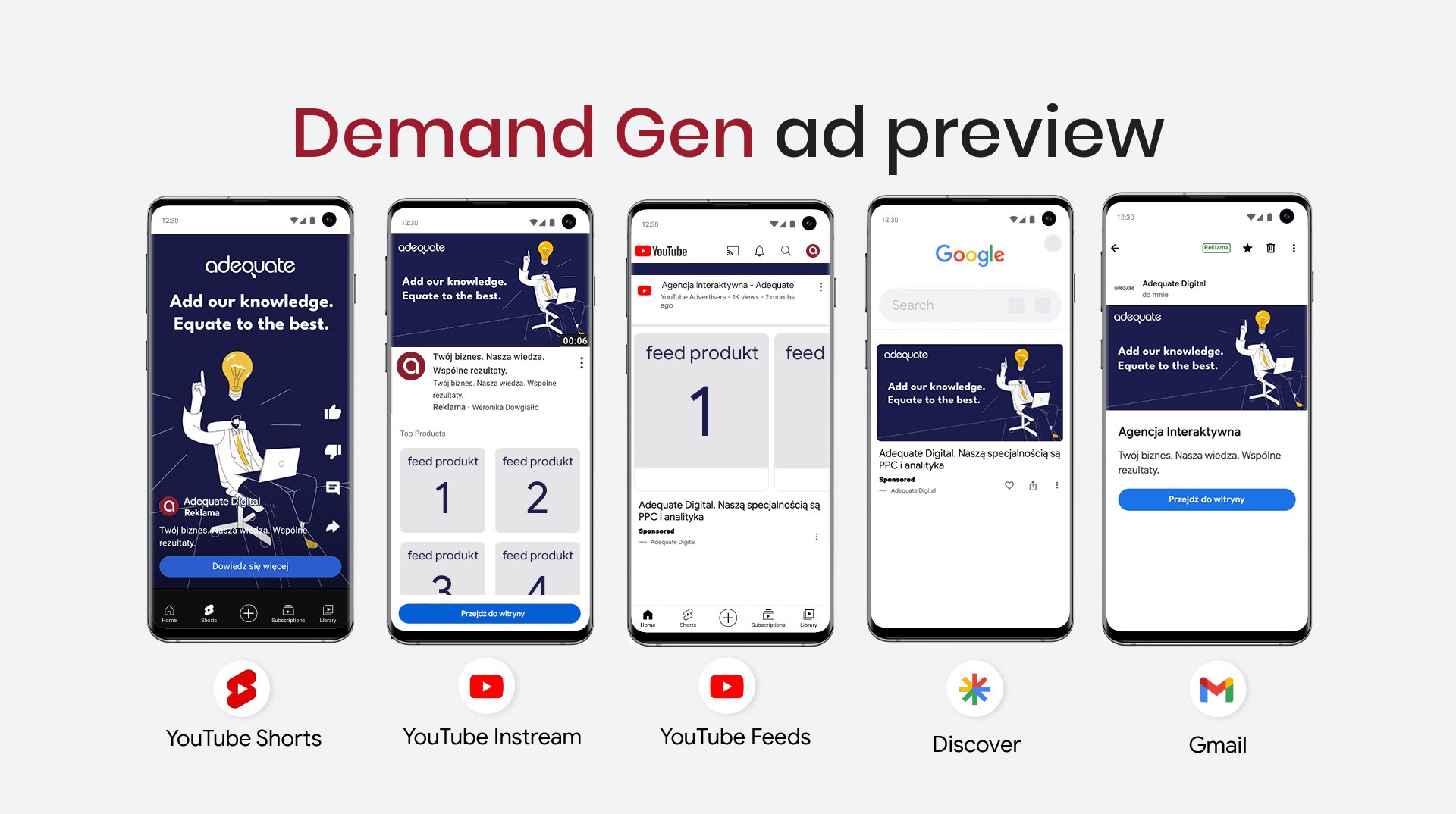
Demand Gen uses static images, carousels and video creatives. They are shown across many different placements in the Google ecosystem, considered among the most attractive to audiences. These are:
- YouTube In-Feed (ads on the home page, the video page, the search tab);
- YouTube In-Stream (ads shown directly before a video);
- YouTube Shorts (ads shown on mobile devices before short videos — Google’s answer to TikTok and Meta Reels);
- Discover (ads shown in the “Discover” feed on Android mobile devices, in apps provided by Google);
- Gmail (ads in email).
Note that not all placements are available for all ad formats. For example: video materials won’t be visible in Gmail, while static images won’t be shown in YouTube Shorts. Using all formats is the foundation of a successful Demand Gen campaign — it makes your product visible in every available placement!
Detailed guidelines on creative specifications for demand generation campaigns can be found in Google’s materials.
The saying “content is king” fits demand generation campaigns like a glove — they are meant to attract attention and motivate people to get to know the product or brand. What we get from Google are the most “lifestyle” and prominent placements, but it’s up to the brand and/or agency to make good use of that space.
For Demand Gen campaigns, choose the highest-quality ad creatives — make sure they catch the eye and properly showcase the product along with its benefits. Think mobile-first — make sure the creatives display well on vertical screens.
In video ads, take care of logo exposure — adding suitably large captions and a voiceover is also good practice. Remember to include a call to action in the creatives, visible in the image/video and audible in the soundtrack. Take the safe area into account — try to place the most important elements in the middle of the frame.
Don’t forget about a sufficient number of creatives and their variants — where possible, add several versions of images, videos and ad texts, letting the algorithm pick the best-performing option and feeding it extra data for optimization. If you use a product feed in Merchant Center, you can plug it into Demand Gen ads!
When selecting creative assets for a Demand Gen campaign, follow the “rule of three”. Make sure to provide the campaign with 3 descriptions and 3 headlines, and to add an image and a video in three orientations (vertical, horizontal, square) to every ad.
The return of lookalikes, extensive testing options… and specific budget requirements
Aimed at the middle of the funnel, demand generation campaigns — besides offering interesting ad placements — also mark the return of lookalikes to the Google ecosystem. At the time of writing, they are the only campaign type offering targeting of users similar to people who have interacted with your brand. This option is worth using when you want to reach audiences potentially interested in your product.
Remember to give the lookalike list good “seed” material — ideally a list of people who are as similar to each other as possible: you’ll get better-quality lookalikes based on data about customers who converted than from an “All Users” list. This makes it easier for the algorithm to pick out what the users in the seed have in common, optimizing the process of matching similar people.
Keep in mind the importance of 1st party data — be sure to use your user lists, provided of course that you’ve obtained marketing consents from them in accordance with the law. They can be used in two ways: for remarketing, and as exclusions — to reach people who don’t know your brand yet.
Demand Gen campaigns offer a few interesting testing options that can help optimize your marketing. You’ll find them in the “Experiments” tab of the Google panel. They can be used to test creatives or audience lists. To start an experiment, create at least two campaigns — it’s important that they differ by a single variable, e.g. contain different videos or use different targeting.
All the benefits of demand generation campaigns come at a price, though. Literally. If you run a campaign with the “Maximize conversions” or “Target CPA” goal, Google recommends the campaign’s daily budget be at least 15 times the average or target CPA, or min. $100 per ad group — whichever is higher.
For campaigns with a target ROAS goal, the minimum daily budget can be calculated with the formula: 20 x (AOV / tROAS). There are no minimum budget requirements for a campaign optimized for maximum clicks (though such a campaign will most likely bring only a handful of conversions).
When setting up a campaign, note that:
✅ The recommended budget is $100–500 per day per ad group;
✅ Ad groups with more than 50 conversions perform better;
✅ No minimum budget is required.
For optimal results:
✅ Set the daily budget to at least 15 times the average expected CPA, or $100 per day per ad group (whichever is higher);
✅ Set the minimum budget using the formula: 20 x (AOV / tROAS);
✅ Use the ROAS value from the last 30 days and adjust it once the campaign reaches at least 50 conversions;
✅ If the campaign is budget-constrained, use the Performance Planner.
Finally — remember that, like any other campaign, Demand Gen needs time to “spin up”. Don’t panic if you don’t see good results right away — the algorithm needs 2 to 3 weeks to optimize. You can help it by reducing the number of ad groups… or by raising the budget 😉.
This article was written in June 2024. If you notice that any information in it is out of date, drop us a line!
