One of the important stages of attribution modeling is creating channel groupings for multichannel paths tailored to your own needs. In theory you can do without them, but even if you don’t start there, in practice the need to use them will sooner or later arise.
Previous article (part 1): Introduction to attribution modeling
Channel groupings make it possible to group the sources of visits to a site into categories. Traffic coming from particular sources, mediums, or campaigns can be combined into one broader category or split among several categories based on chosen criteria.
To start, it’s worth reading the Google Analytics help article on channel grouping.
The default channel group in Google Analytics
Every Google Analytics account has a system-defined default channel group. It covers channels such as: Direct, Organic Search, Paid Social, Email, Affiliates, Referral, Paid Search (paid search traffic, e.g. Google Ads), Display, and so on:
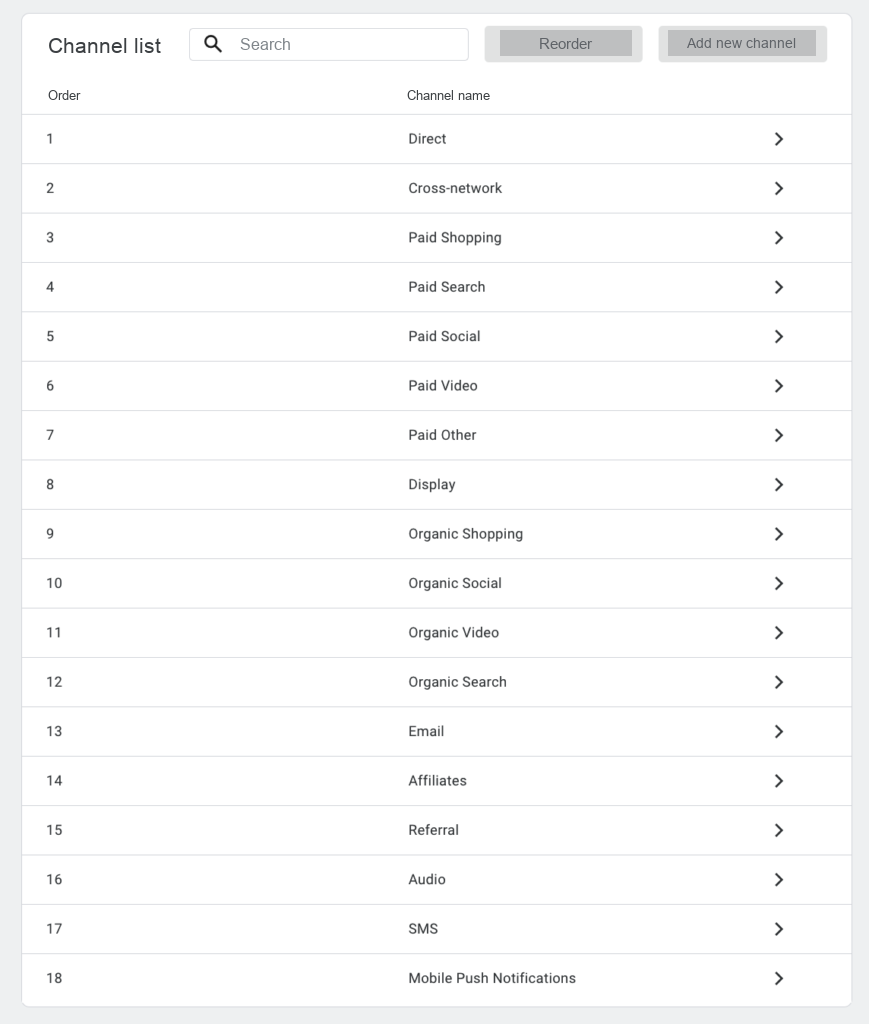
Traffic that doesn’t match any of the categories will be reported as Unassigned.
The detailed rules for classifying sources into channels are described in the Analytics help article on the default channel group.
The default channel group can’t be modified. You can, however, copy it and create your own group based on it — for example, splitting the Paid Search channel into brand-related keywords (naming this group, say, Branded Paid Search) and the rest (Generic Paid Search).
Custom channel groups in Google Analytics
In Analytics you can also create your own channel group from scratch. Creating your own group lets you adapt the channel definitions to the traffic that actually occurs on the site and to your analytical needs.
In the real world, not all traffic will be tagged correctly so that the system-defined criteria identify it properly. Mailings won’t always have the medium “email” — sometimes it’ll be “newsletter”, “mailing”, or something else entirely. We may want to group separately referrals from specific sites, e.g. from price comparison engines.
Custom channel groupings give you certainty that a given channel contains exactly what you want.
Custom channel groups are created in the property settings and are available to all users with access to that property.
Changes are retroactive
Changes made to custom channel groups will group traffic according to the defined rules retrospectively as well — that is, in relation to historical reports. Changing a definition will also change the classification of traffic in earlier periods. Custom channel groups can therefore be changed and reverted without worry — they won’t cause irreversible changes to the data.
Note! Changes made to the primary channel group (described later in this article) are not retroactive.
Rule order
Rule order matters! A subsequent rule will be applied only to traffic that didn’t meet the earlier rules. For example, if we define the “Google Ads” channel as follows: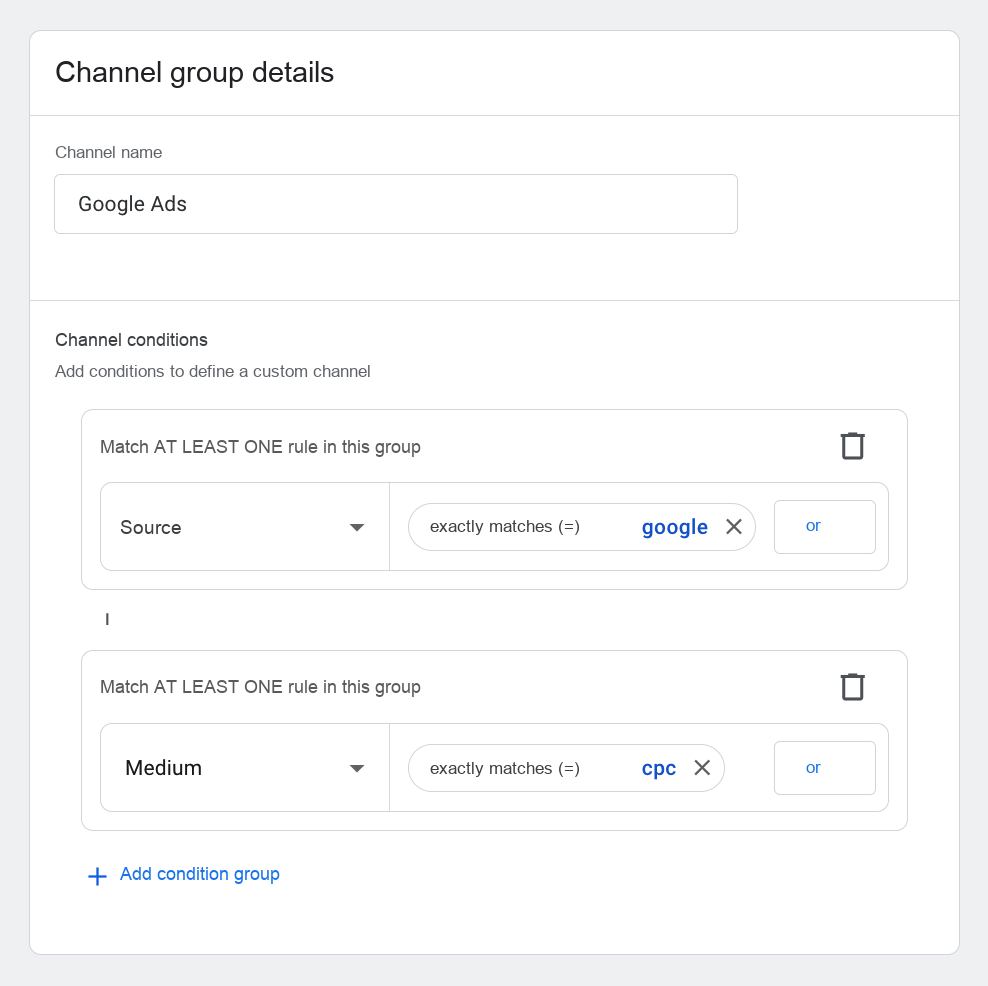
and next the “Other PPC” channel as: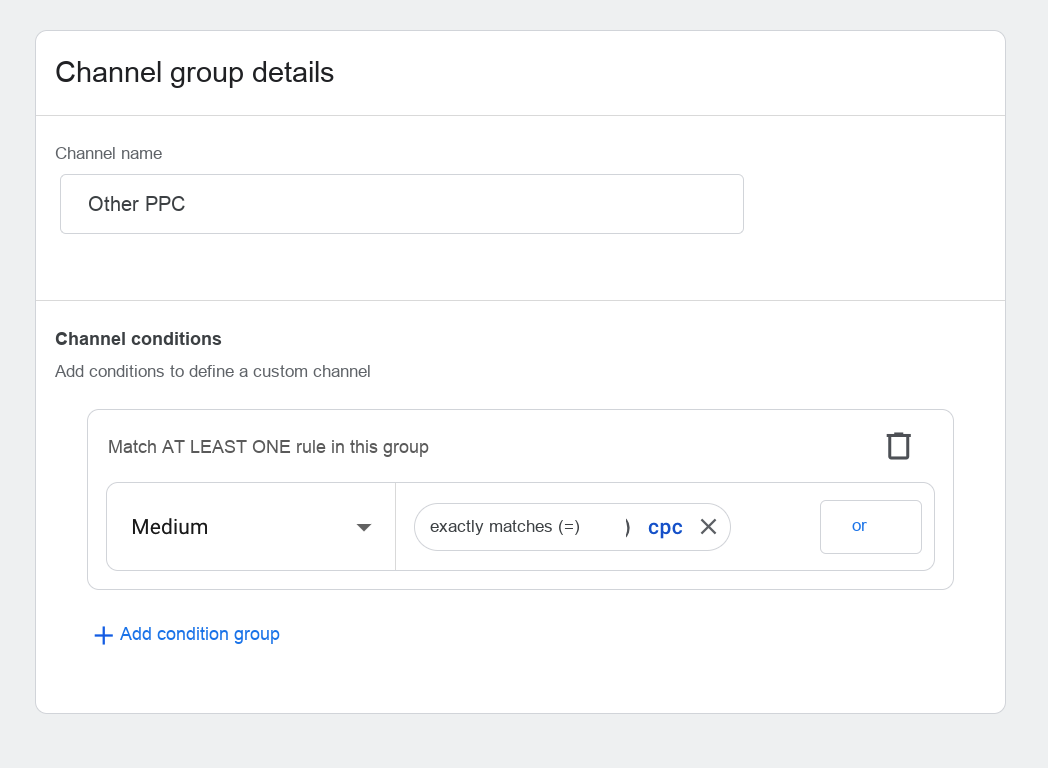
– then even though traffic from google/cpc meets the criterion for being classified as “Other PPC” (medium = cpc), it won’t end up in that channel, because it was already captured in the “Google Ads” channel, which is higher in the hierarchy.
If for some reason we wanted to define the “Other PPC” channel before Google Ads, then we’d have to exclude traffic from google/cpc, using, for example, a definition like the one below: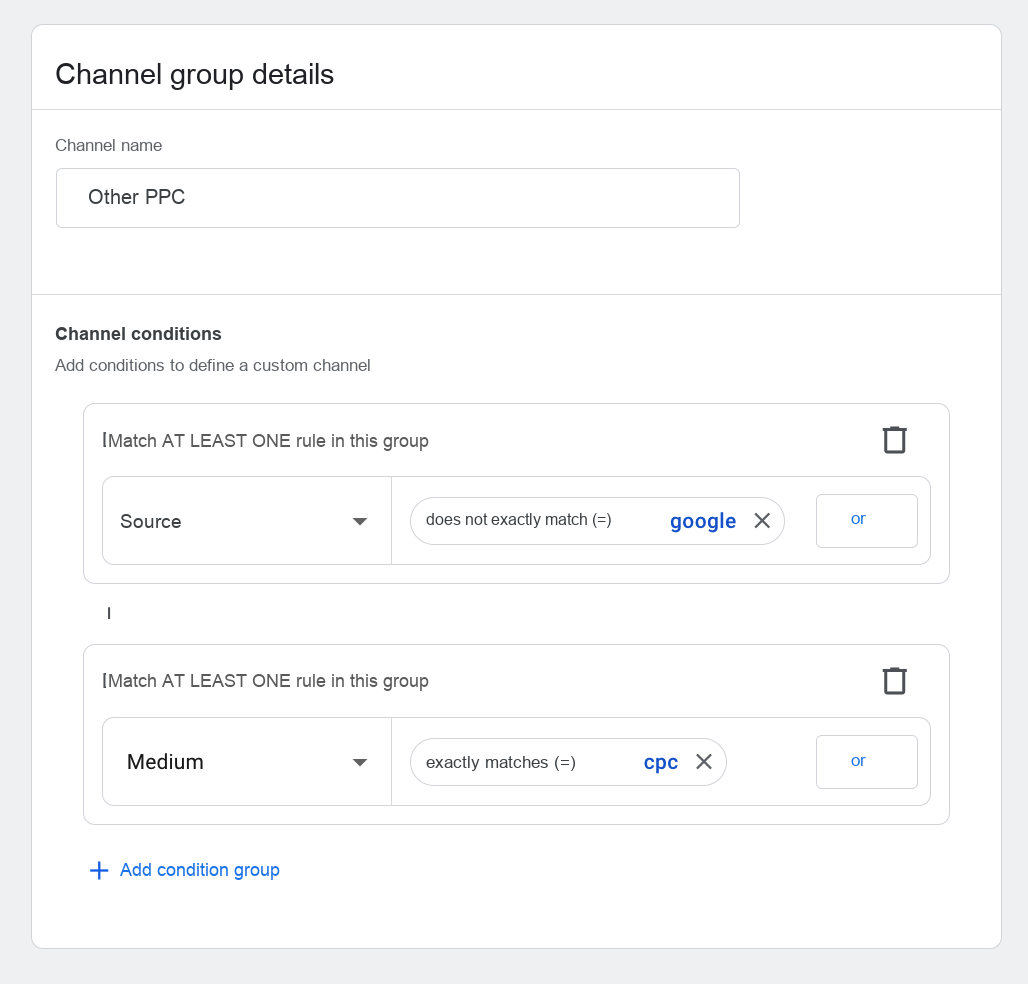
Nevertheless, with skillful ordering of rules we can avoid such complicated definitions. New definitions are added at the end. The “Reorder” button is located next to the button for adding a new channel.
Upper- and lowercase
Criteria definitions are case-insensitive, i.e. traffic with the medium “cpc” and “CPC” will be treated as matching “cpc”, but also “CPC”.
The primary channel group (Google Analytics)
In Google Analytics, one of the channel groups available on the account is designated as the primary channel group. This can be the default group or any of the groups defined on the account. If we don’t make any modifications, the primary group will (by default) be the default channel group.
Some Analytics features are available only for the primary group or the default group. So if we wanted to use these features with our own channel group, we’d have to set that custom channel group as the primary group.
Changes made to the primary group are not retroactive. This means a new channel group set as the primary group will apply from the day the change is made. Earlier primary-group reports will still be generated based on the earlier definition.
The primary group should not be modified too often, and changes should be made carefully. The resulting changes in reports are irreversible — that is, a subsequent change of the primary group will apply only to reports for periods after it was made.
A sample channel-grouping configuration for e-commerce
Here is an example of channel grouping to use in particular in the e-commerce industry.
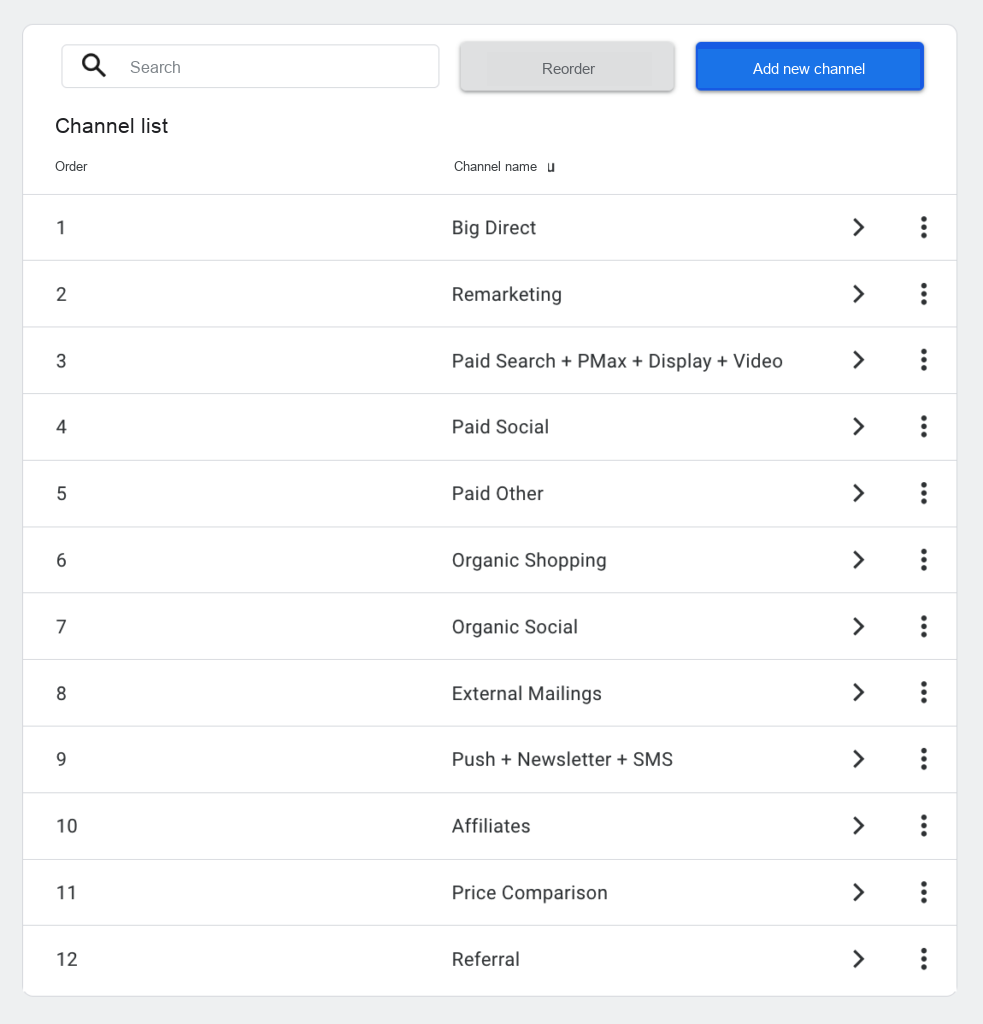
Big Direct
Into this channel we count all direct visits and visits from search engines where the keyword or search term contained the name of our own brand or website — terms that clearly indicate the user wanted to go to exactly our site (e.g. a user wanting to reach allegro.pl will search for “allegro”).
Why so? In this approach to attribution modeling we’ll assume that interactions of this kind are not a touchpoint and don’t represent a specific marketing activity. True, they don’t come from nowhere — they’re the effect of the user’s familiarity with the brand, and that is the result of a range of online and offline activities affecting the user directly through recommendations from other users. We’re not able to identify those activities.
And it makes no difference here whether the user typed the site address directly or searched for its name in a search engine. The intent is practically the same. For this reason it’s justified to treat search-engine visits the same as direct visits.
Organic search results split into brand and generic keywords
For this grouping to work fully, we have to remember that data about keywords and search terms in visits from organic search results is not read by Analytics (nor by any other analytics program, because search engines don’t pass it on externally).
That’s why filtering by search terms won’t catch brand-related queries, and all visits from organic search results will end up in the Organic Search group in the default channel group.
One signal of whether we’re dealing with a brand search can be the landing page — brand searches usually lead to the home page, while visits to category, product, or blog pages are more likely to concern generic keywords.
Currently (January 2024) Analytics doesn’t allow using the landing page as a criterion for classifying into a channel.
That’s why you have to decide whether to count organic traffic into Big Direct or define it as a separate channel. Data from Search Console will help with this decision — there you’ll find reports on search terms and landing pages in Google’s organic results. If it turns out that most search terms are brand-related, it’s worth considering including the criterion medium = organic in Big Direct.
In 2024, Google Analytics introduced a terminology change and what were previously called conversions in Analytics were renamed key events, while the term “conversion” was reserved for events exported to and shared with Google Ads. In this article the use of the word “conversion” (in the general sense) will not always match Analytics terminology.
What really matters here is what share of the generated conversions falls to these keywords, which unfortunately we can’t check in Search Console (importing Search Console data into Analytics won’t help in this case).
We can, however, estimate it, knowing the difference in conversion rate for generic and brand keywords in Google Ads. If “B” is the share of brand traffic in total organic traffic, and “K” is the number indicating how many times better brand traffic converts than generic traffic, then using the formula below we can calculate the share of brand conversions:
X = K / [(K-1) + 1/B]
For example, if brand keywords make up 75% of organic search traffic and convert 5× better than generic keywords, it means that brand searches account for X = 5 / [(5-1) + 1/0.75] = 5 / 5.3333… = 0.9375 of the conversions from that traffic. The table below shows the result of this formula for sample values of B and K:
| B\K | 2 | 3 | 4 | 5 | 6 |
| 0.1 | 0.18 | 0.25 | 0.31 | 0.36 | 0.40 |
| 0.2 | 0.33 | 0.43 | 0.50 | 0.56 | 0.60 |
| 0.3 | 0.46 | 0.56 | 0.63 | 0.68 | 0.72 |
| 0.4 | 0.57 | 0.67 | 0.73 | 0.77 | 0.80 |
| 0.5 | 0.67 | 0.75 | 0.80 | 0.83 | 0.86 |
| 0.6 | 0.75 | 0.82 | 0.86 | 0.88 | 0.90 |
| 0.7 | 0.82 | 0.88 | 0.90 | 0.92 | 0.93 |
| 0.8 | 0.89 | 0.92 | 0.94 | 0.95 | 0.96 |
| 0.9 | 0.95 | 0.96 | 0.97 | 0.98 | 0.98 |
As you can see, the share of brand conversions can be very high in many seemingly innocent-looking situations.
Unwanted referrals
Direct traffic also includes visits from users who clicked a link to the site in an email client (e.g. Outlook) or another app that doesn’t pass referrer data, such as messengers or SMS — of course, provided those links weren’t appropriately tagged with UTM parameters.
On the other hand, if such a link is clicked on a webmail page (e.g. mail.google.com), it will appear in Google Analytics as a referral from that site.
It seems there’s no point in treating users differently just because they used a different app — that’s why traffic from these sites is also worth counting as direct traffic (see also the article 4 exclusions in Google Analytics you should enable — you’ll read there why, besides the exclusions mentioned, it’s also worth excluding online payment gateway pages).
Let’s remember that these exclusions won’t work retroactively, i.e. they only apply to visits that took place after the day the changes were made.
Why do we combine so many sources into one channel? Big Direct is users for whom we really can’t identify the marketing activity that made them want to visit our site. These users knew the site’s address or its name and wanted to go to it. Even if the link was sent in a message, we don’t know where it came from — whether the user sent it to themselves, or whether it’s a friend’s recommendation — it can’t be tied to any specific marketing activities.
Or maybe Paid Branded Search separately?
Nothing stands in the way of creating, for the needs of some analyses, another channel group in which paid search traffic related to brand keywords is separated into a dedicated Paid Branded Search channel.
This can be especially justified in cases where, in selling our product, we compete with other stores that also offer it. For example, store.nike.com will compete on brand-related keywords, e.g. “nike shoes”, with many other stores, so a Google Ads campaign on these keywords can contribute to increasing sales in the store.nike.com store (though probably no longer to the company’s global product sales).
Remarketing
Remarketing is usually a very effective marketing channel, but it plays a special role on the attribution path — it wouldn’t have a reason to exist without earlier visits from other sources. In some attribution models we’ll want to ignore its influence in order to better answer the question of where the users generating revenue originally came from. So maybe combine all remarketing campaigns into one channel regardless of source and separate them from other display and social media activities?
The criterion for classifying into the channel in this case will be above all the campaign name, e.g.:
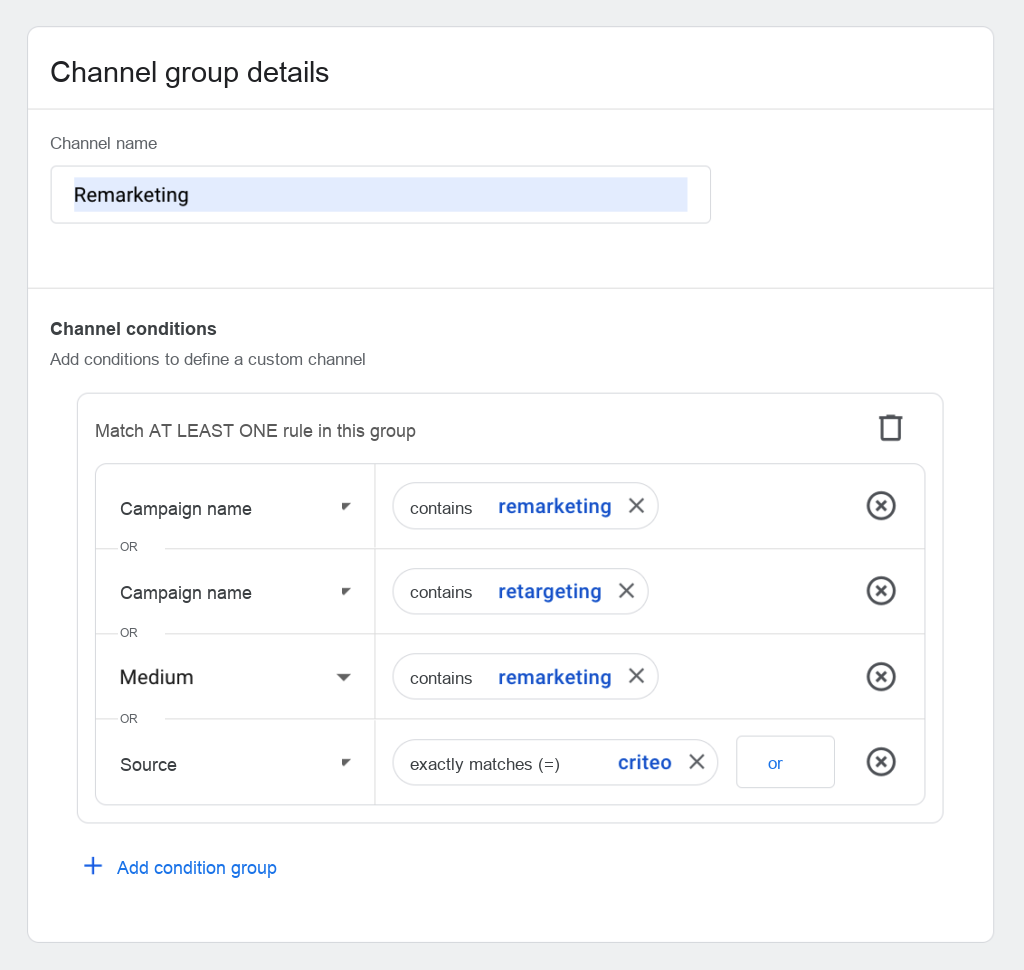
For this to work correctly, we of course have to ensure appropriate campaign naming and appropriate tagging of ads from outside Google Ads.
In a rule we can apply several “or” conditions, so campaigns can have “remarketing” or “retargeting” etc. in their name — the important thing is that these markers unambiguously distinguish remarketing campaigns from prospecting activities aimed at acquiring new users.
External and internal mailings
The default channel group splits messages sent to users by medium (email, push, SMS). In a custom channel group we can split these activities into external campaigns (e.g. mailings to external databases) and activities on our own database (push, newsletter, sends within marketing automation).
This is justified in that, despite similar mediums, these activities have a completely different role on the attribution path, just like prospecting and remarketing.
Price comparison engines
Traffic from price comparison engines is usually characterized by a high conversion rate (it’s the very bottom of the marketing funnel). If it accounts for a significant part of revenue, it’s worth separating it out.
How to fix reports with channel groupings
Whoever has never had a mess in their reporting, let them cast the first stone. Here are a few typical situations:
- Visits and transactions from external sites handling the shopping cart (e.g. online payment gateways) appeared in the reports;
- Typos, capitalization, or a change in the name passed to UTM caused the same source/medium/campaign to appear under two names;
- Some sources report themselves inconsistently — e.g. traffic from Facebook may appear with the source facebook.com, l.facebook.com, lm.facebook.com, m.facebook.com;
- Some internal links or banners on the site were tagged with UTM parameters to track the performance of internal campaigns, which caused them to appear as traffic sources;
Problems of this kind make analysis harder. Even if we remove the configuration errors and introduce appropriate exclusions, they won’t work in relation to historical data.
Channel groupings let you assign such traffic to the right group, and since channel assignment works retroactively, this will also cover data collected so far.
Unfortunately, as of today (January 2024) Analytics doesn’t allow creating custom attribution models, which would also let you correct the attribution of traffic sources retroactively and, for example, remove attribution to unwanted referrals such as payment gateways.
Best practices
When creating channel groupings, it’s worth keeping a few principles in mind.
- There shouldn’t be too many channels. The main benefit of creating them is precisely grouping traffic sources into several to a dozen or so groups.
- Traffic that wasn’t assigned to any channel (Unassigned) should account for a relatively small part of revenue, insignificant to the overall picture. All channels significant from a revenue standpoint are worth defining.
- Channels that account for little revenue are worth merging into others, or reconsidering whether it makes sense to define them at all — perhaps the place for that traffic is precisely in Unassigned.
Let’s remember: the main goal of creating channel groupings is to increase the clarity of reports and make analysis easier. That’s why it’s worth starting with them, before we get stuck in a thicket of traffic sources and campaigns.
If you’re interested in consulting on attribution modeling, we invite you to contact us.
Next article (part 3): Terminology
Worth reading: A guide to attribution in Google Analytics
