
With browsers restricting support for 3rd party cookies, Chrome prepared a set of features under the name Privacy Sandbox, meant to replace 3rd party cookies and enable the legitimate purposes they were used for — while protecting user privacy.
Work on this technology dragged on, and successive launch dates were repeatedly postponed. The rollout of Privacy Sandbox in Chrome began in January 2024 for 1% of users, with full adoption expected at the start of 2025.
In July 2024, Google announced that, in light of the Privacy Sandbox pilot results, delays in the ad industry’s implementation of Privacy Sandbox, and the objections raised by those companies, it was abandoning the complete withdrawal of 3rd party cookies. Instead, Chrome users will get an easy way to choose their privacy level and the scope of data processed.
Regardless of the final date of 3rd party cookies’ withdrawal from Chrome, considering what has already happened in Safari and other browsers, 3rd party cookie technologies will be pushed further and further to the margins. Their complete withdrawal from Chrome will mean the de facto end of this technology.
It’s worth emphasizing that the withdrawal of 3rd party cookies is not the end of cookies as such. 1st party cookies remain — it’s hard to imagine digital services functioning without some form of 1st party storage.
How do 3rd party cookies differ from 1st party?
1st and 3rd party cookies differ only in how the data they contain is saved and read.
| 1st party cookie | 3rd party cookie |
|---|---|
| Created by the site you’re visiting and assigned to its domain. | Created by a site (server) from a different domain than the one being visited, e.g. by a tracking script. |
| Only that site (in that domain) can read its contents. | Can be read by a script from the domain it originates from, placed on any site. |
| Example: The site adequate.digital creates a cookie containing a user identifier for statistical purposes and records the source of the visit in its analytics system. Thanks to the cookie, on the next visit the analytics system knows it’s the same returning user and can determine where they were originally acquired. Other sites have no access to it. | Example: A google.com script placed on adequate.digital leaves a user identifier for advertising purposes and sends Google the information that adequate.digital was visited. Thanks to this, a google.com script placed on another news site can show that user a remarketing ad targeted at people who previously visited adequate.digital. |
A “side effect” of 3rd party cookies’ properties is that the server that created them can collect the history of pages the user visits and other details of those visits. An example is the Facebook cookie, saved and read by the tracking pixel or by other once-popular widgets (e.g. the “Like” or “Share on Facebook” buttons) placed on many sites. Thanks to this, Facebook collects visit history and profiles users on a mass scale for advertising purposes.
What did 3rd party cookies do wrong?
3rd party cookies — small files used to store small chunks of information (usually simple variables or identifiers) — supported functions like spam and bot protection, numerous website features, ad impression measurement, remarketing and interest-based ad targeting.
They pose a privacy threat, however, because they allow almost unlimited collection of information about our online activity and its exchange between unrelated parties.
Imagine buying a safe with home delivery in an online store, then ordering gold bars at an online exchange, and then booking a round-the-world trip. And how would you feel knowing there’s someone who can connect those three pieces of information — and who also knows your address — while you don’t even know who that someone is?
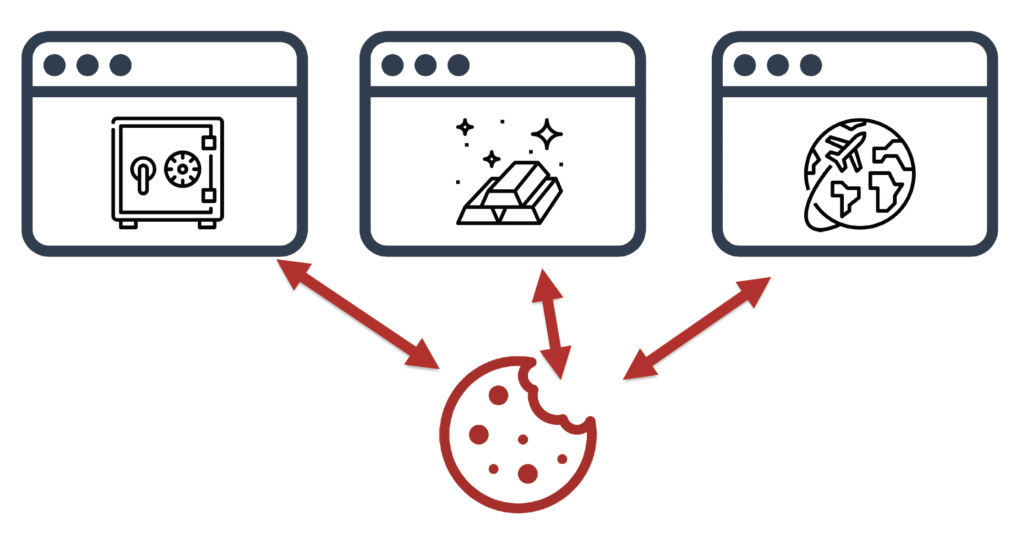
In theory, that’s exactly what a 3rd party cookie makes possible — its contents can be read by any site and any tracking code.
The example above is theoretical, but it illustrates well why 3rd party cookies fell out of favor. Browsers, concerned for user safety, began blocking cross-site tracking — following users across many sites — including support for 3rd party cookies.
An additional motivation for browsers is the intent to protect the data they hold and prevent other parties from using it. Using it, importantly, for free.
The end of 3rd party cookies
Killing off 3rd party cookies came relatively easily to Apple’s Safari, whose owner has no significant ad system. As part of its Intelligent Tracking Prevention package, Safari blocked 3rd party cookies along with many ways of using 1st party cookies for ad tracking. As a result, in Safari we practically never see remarketing ads anymore unless we’re logged in to the Google, YouTube or Facebook ecosystem.
Google, the owner of Chrome, found itself in a difficult position. Its browser couldn’t remain the one with the lowest privacy standards, but at the same time Google didn’t want to give up the revenue from remarketing, which accounts for a substantial share of all campaigns run in the Google Display Network.
3rd party cookies are also responsible for profiling users and serving interest-based ads, and for tracking conversions after an ad impression.
For tracking conversions after a click leading to the landing page, the site’s own (1st party) cookies suffice, because all the necessary information is available within the site. Tracking impressions requires 3rd party cookies, because the ad impression happens on a different site than the landing page.
To avoid annihilating remarketing and other advertising functions along with the cookies, Google prepared a package of solutions called Privacy Sandbox, which allow 3rd party cookies to be replaced in marketing while maintaining security and respecting user privacy.
These solutions had to be designed so as not to favor Google’s own marketing technologies, which could be deemed a monopolistic practice.
Protected Audience API, i.e. remarketing
3rd party cookies played a key role in remarketing in the Google Display Network and in other networks serving remarketing ads, such as Criteo or RTB House.
In Privacy Sandbox, the remarketing function is handled by the Protected Audience API.
Remarketing in this solution is carried out based on the browsing history stored on the device (in the browser).
- When the user visits an advertiser’s site (e.g. an online store), the remarketing code saves in the browser a note of that site’s potential intent to show ads, along with a link to data about the current bids offered in the remarketing campaign.
- When the user visits a site with ad space (a publisher), it sends the browser a list of the ad networks it works with and asks whether the browser would like to display personalized ads from those networks.
- The browser checks (via the aforementioned links) the current bids offered by advertisers in those networks, runs an internal auction and selects the ad to display.
- The ad is then displayed in a so-called fenced frame, whose contents cannot be accessed by the site on which the ad is displayed.
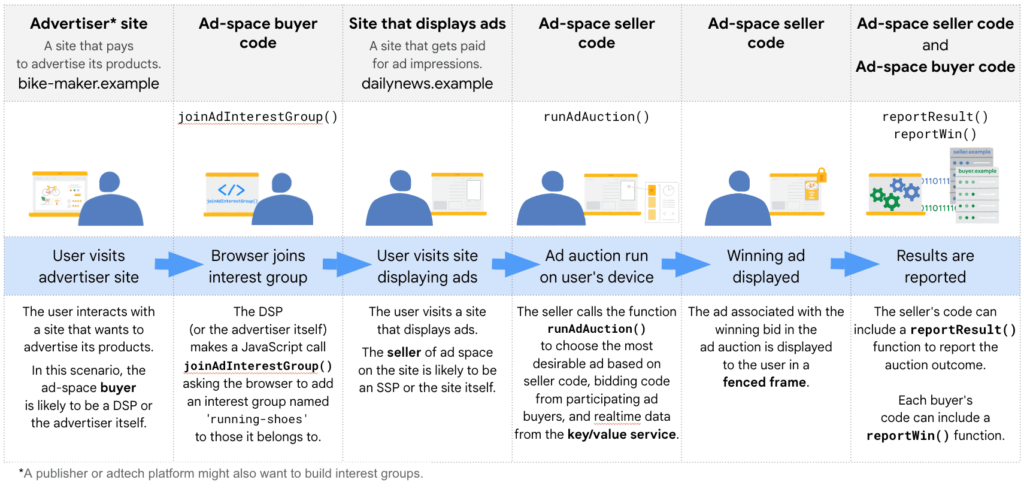
This way remarketing works even though:
- Google (or any other tracker) doesn’t collect information about all the sites the user visits (they don’t profile us).
- The publisher doesn’t know whose remarketing ads were shown to a specific user (otherwise it could profile users itself this way).
More on Google’s Protected Audience API page.
Topics API (interest-based advertising)
In the era of 3rd party cookies, ad networks (e.g. Google) collected information about the pages we visited and on that basis could build our behavioral profile, essentially without limits. Then — based on this data — ad networks let advertisers target ads at specific categories of user interests.
Information about our activity was passed to Google by the AdSense ads (Google ads) displayed to us, or by YouTube videos embedded on various sites (which is precisely why consent is needed to load them). What allowed this information to be connected was the 3rd party cookie.
Now it will work differently. The new solution is called the Topics API.
Just as with remarketing (Protected Audience API), information about the user’s interests is collected by the browser, not the ad network.
The list of usable interests comprises several hundred moderately detailed categories, defined transparently in a human-readable way and excluding sensitive categories (see the Topics API category list).
The Topics API determines these interests based on the domain of the page the user visits. They are available only to those ad networks that initiated the collection of this information through the given network’s script used by the visited sites:
- The user visits a page containing an ad network’s code. The user’s interests, determined from the visited page’s domain, are saved in the browser “at the request” of the ad network code present on that page.
- If the user visits a page with ad space served by that ad network, the network will be able to learn about the interests it ITSELF recorded and use them to display an appropriate ad.
Access to the interests stored in the browser is, however, limited to three categories, randomly selected from among the five most important categories identified in each of the last three weeks (epochs). The starting moment of an epoch is also randomized per user. All of this is meant to prevent the ad network from identifying the user based on their interests.
Additionally, to further reduce the risk of identifying the user, 5% of the returned interests are completely random.
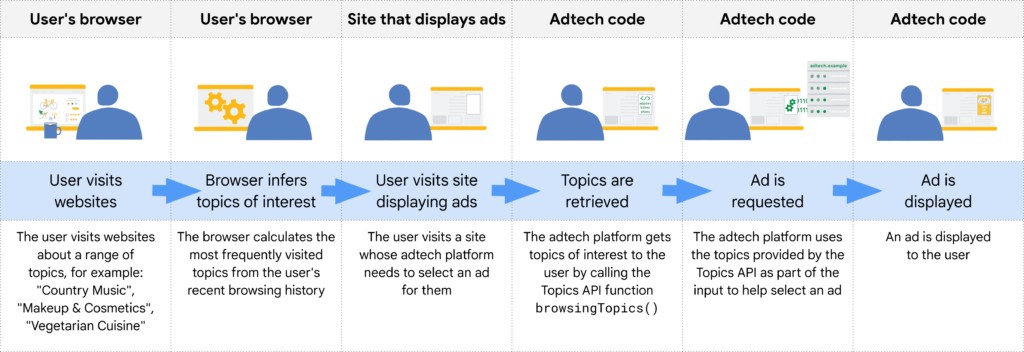
In other words:
The ad network will no longer store a detailed history of the pages we visit.
It’s the browser that will store highly generalized information and share it in a limited, selective, random and slightly distorted way — and only with the network that recorded it.
The user will have control over the information stored and shared by the browser, including the ability to block this function entirely.
You can read more about the Topics API on Google’s pages.
Attribution Reporting API (measuring ad impressions and conversions)
Alongside the Topics API and Protected Audience API, one more Privacy Sandbox function important for marketing deserves a mention: the Attribution Reporting API.
The word “attribution” brings attribution models to mind. Here, however, it’s about the measurement of ad effectiveness itself — linking ad clicks and impressions to conversions — without 3rd party cookies.
The Attribution Reporting API provides two kinds of reports:
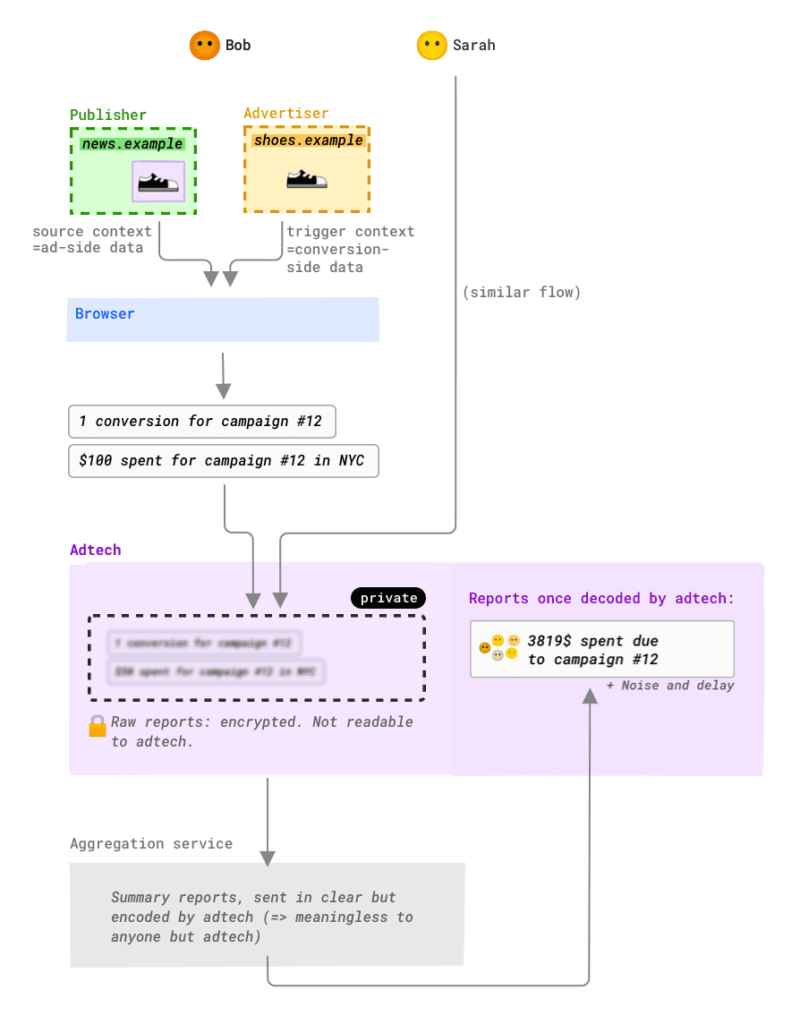
1. Event-level reports (see the illustration)
The identifier of a viewed or clicked ad (ID) is saved in the browser along with the address of the domain where a conversion is expected.
If the user converts, the reporting system receives the information that a conversion followed the display of ad ID.
The conversion data is limited (max. 3 bits of information); on top of that, small distortions and a random delay are added. The purpose of distorting the data this way is to limit the possibility of using it to track the user.
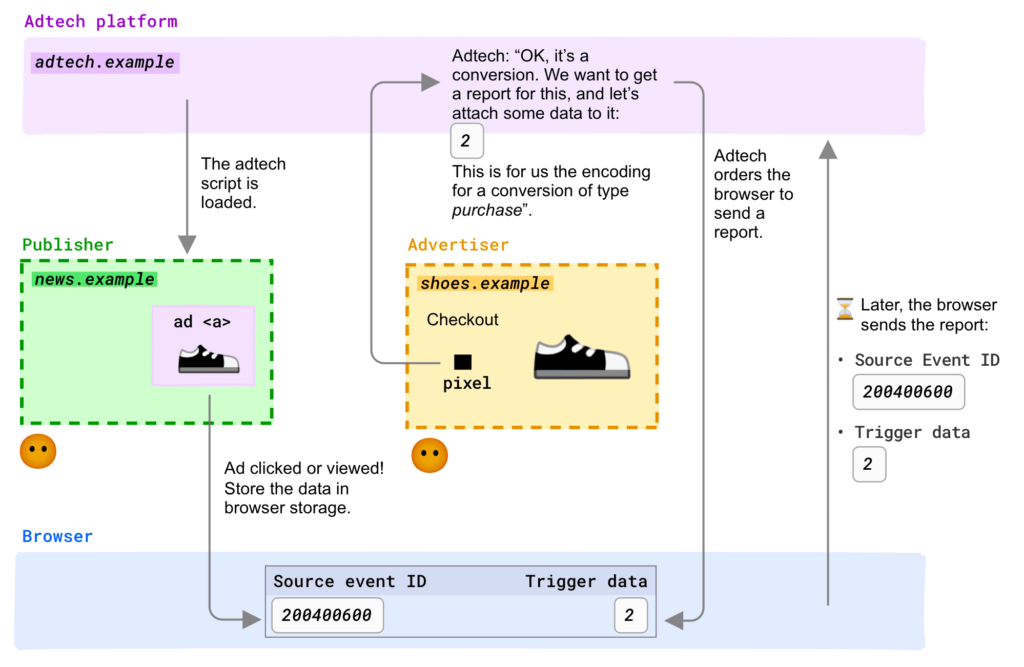
It resembles Apple’s PCM (Private Click Measurement), but it also enables impression tracking.
2. Summary reports
These reports don’t include the ad ID, but based on it the browser obtains data about, say, the campaign, ad group etc., plus conversion information (e.g. the transaction value), and AFTER ENCRYPTING it sends it to the reporting system.
That system cannot read this encrypted information and sends it to an aggregation service running in a trusted execution environment, which aggregates the data and adds distortions (e.g. changes a conversion value from 50.12 to 53).
Note that a transaction’s value combined with its date (even approximate) often allows a user to be unambiguously identified. Reducing the number of unique transaction values limits the possibility of using the transaction value as an identifier.
Thanks to data aggregation, information about a single event can no longer be obtained. The more detailed the data we get about the transaction, the less precise the data about its source. The more granular the source report, the fewer details about the conversion itself we get.
[An illustrative example] We may determine the value of a given transaction and the campaign attributed to it, but not the keyword. In the keyword report we’ll see total revenue, but the data of a specific transaction will no longer be available.
Such data, after decryption, is sent to the reporting system.
What does this mean?
The Attribution Reporting API makes it possible to link a specific ad click with a conversion — something Apple’s PCM doesn’t allow. Conversion data is limited, however, and cannot contain personal data (an identifier) or details of activity on the landing page.
More precise reports are available, but linking a click identifier with a specific conversion (e.g. an ecommerce transaction ID tied to the buyer’s personal data) is not possible.
This is meant to prevent user identification and the use of the analytics system as a backdoor for cross-site tracking.
The price paid for increased security and user privacy is lower reporting precision. Noise is applied to the signal, and not all information is available — especially at high levels of granularity. Reporting is delayed, and the reported conversion date is also approximate (with an uncertainty of 1–2 days).
Does this mean this is what the analytics of the future will look like? Yes and no. Programs like Analytics, which analyze visit sources (including ad CLICKS) in a 1st party context, will keep working as before.
For measuring conversions after an ad IMPRESSION or engagement outside the landing page — that is, wherever a 3rd party context is needed — once 3rd party cookies are switched off, measurement systems will have to use the Attribution Reporting API.
More information on Google’s Attribution Reporting API page.
Privacy Sandbox and user consent
And how does this look from a legal standpoint and the user consent requirement?
Despite eliminating or drastically limiting the processing of personal data, these solutions are unlikely to remove the obligation to obtain the user’s consent.
By way of example, let’s see (with some simplification) how “old” and “new” remarketing via the Protected Audience API differ from a data-processing perspective. In this example, “Google” could equally be Criteo, RTB House and so on, and “the News site” any publisher.
3rd party cookies
- The user visits the Store’s site.
- A Google script on the Store’s site leaves an identifier in a cookie in the user’s browser (if it wasn’t already there).
- The Google script reports to Google that the user’s browser (with the given identifier) visited the Store’s site.
- (Some time later) The user visits the News site, which has Google ad space.
- The Google script on the News site reads the identifier from the cookie and checks whether advertisers want to show this person an ad.
- Google runs an auction among advertisers interested in this user.
- The ad that wins the auction is sent to the News site (e.g. the Store’s ad) and displayed to the user.
In consequence:
- A user identifier is stored on the device, which Google can sometimes also link with that user’s Google account (it constitutes personal data).
- Google collects the history of pages the user visits and can profile them.
- The News site sees which ads the user views and clicks, and can accumulate this data and profile the user.
Protected Audience API
- The user visits the Store’s site.
- A Google script on the Store’s site leaves the advertiser’s (Store’s) identifier in the user’s browser.
- (Some time later) The user visits the News site, which has Google ad space.
- The News site informs the browser that it’s interested in displaying Google ads.
- The browser checks what bids Google’s advertisers are offering.
- Based on the bids, the browser runs an auction.
- The winning ad (e.g. the Store’s) is delivered in an isolated frame the News site has no access to, and displayed to the user.
As a result:
- An identifier linked to Google and the advertiser is stored on the device (it does not constitute personal data).
- Google DOES NOT COLLECT the history of pages the user visits.
- The News site CANNOT collect the history of ads the user has viewed.
- The user’s privacy is protected: third parties don’t collect the history of their online activity, yet the ads still follow them.
In a sense, in the Protected Audience API, as in the Topics API, instead of ad networks processing the user’s data, we now have the user processing the ad networks’ data on their own device. You could say the roles have been reversed.
The difference, then, is that no personal data is transferred — the GDPR doesn’t apply.
Instead of a user ID, the browser stores the identifier of the ad network and the advertiser (the visited site).
Under ePrivacy (telecommunications law), however, this means consent is still required, because this identifier isn’t necessary for the site to function.
Lukasz Olejnik reached a similar conclusion.
Related Website Sets
If you provide services across several domains, another Privacy Sandbox feature is worth noting: Related Website Sets (RWS). This feature makes it possible to apply a 1st party context to sites maintained on different domains, and to pass identifiers between them the way 3rd party cookies used to allow.
It allows, for example, passing the contents of a shopping cart or login state, or passing the consent status or content personalization data between such sites, as if they were on a single domain.
More information on this on Google’s pages.
What a marketer should know about Privacy Sandbox
Do you, as a marketer, need to know the details of how these technologies work? Not necessarily. Their adoption is primarily the MarTech companies’ concern. Just as a driver doesn’t need to know how a car engine works.
Nevertheless, knowing the operating principles (not necessarily the technical details) of these solutions can make it easier to assess their regulatory compliance and to properly describe the data processing, e.g. in a privacy policy.
It’s also worth knowing that Privacy Sandbox is also a set of analogous solutions for Android.
Beyond the solutions described above, Privacy Sandbox also includes technologies for handling embedded content and features, abuse protection, and identity verification, which until now relied on 3rd party cookies. These will be of more interest to the engineers building web and mobile applications.
Adapting to these solutions is above all a task for ad networks and developers; advertisers should mainly make sure they use up-to-date versions of tracking scripts and tags and the rest of their analytics and marketing software. See e.g. the information for Campaign Manager users.
You’ll find more information on the Privacy Sandbox site.
