
Adding negative keywords to Performance Max campaigns wasn’t possible at first, but it is now a feature that works much like in search or Shopping campaigns.
Account-level exclusions
The Google Ads panel lets you add account-level negative keywords that apply to Performance Max campaigns — this is the simplest solution. When adding exclusions, keep in mind how negative keywords work and that negatives, even in broad match, do not cover synonyms.
Campaign-level exclusions
Around the turn of 2024 and 2025, the ability to add your own negative keywords at the campaign level was introduced.
Brand exclusions
Brand exclusions work at the campaign level. This feature lets advertisers block their products from showing in the context of specific product brands — for instance, if they decide they don’t want to appear for certain queries, or they’ve reached such an agreement with the owner of a competing brand. It’s worth noting that:
- Brand exclusions also cover alternative spellings, common misspellings (typos) and the brand written in another language.
- The feature is also designed to exclude your own brand’s terms.
More about brand exclusions in the Google Ads help article.
Why would we exclude our own brand?
In theory, Performance Max campaigns with a product feed were not supposed to need negative keywords at all. The algorithm selects by itself the phrases that trigger the ads and eliminates those that hurt campaign performance.
That’s why Google points out that search term exclusions aren’t needed for campaign optimization and should only be used for brand safety purposes — e.g. in contexts that could stir controversy — and doesn’t encourage adding your own brand’s keywords as negatives.
In many cases, however, this isn’t necessarily in the advertiser’s interest — for example, when for brand queries the advertiser’s site dominates the organic results and competitors’ ads either don’t show or have no noticeable influence on customer decisions. Showing ads in that situation won’t meaningfully increase sales; it will merely cannibalize organic results, generating extra costs that for strong brands can be quite substantial.
An impression or a click on an ad when the user is searching for our store or our own brand can hardly be considered a touchpoint — at most it’s a defensive move, protection against competitors’ ads. When analyzing campaign effectiveness in terms of incremental conversions, conversions in generic and brand campaigns should be treated completely differently. The goals of generic and brand campaigns will likely differ too.
Remember that this is about your own brand, not the brands of products the store sells. For example, for the store sportano.pl the brand term would be “sportano”, but not the brands of the products on offer, such as “adidas” or “the north face”.
Brand campaigns on a separate account?
While separating out brand campaigns, you can also consider moving them — including the brand Shopping campaign — to a separate account with separate conversion tracking, i.e. without the shared cross-account conversion tracking feature. This lets you assign more value to conversions from generic terms thanks to “non-brand” attribution, which likely reflects a greater impact on incremental conversions.
A Shopping campaign targeted at keywords
Showing ads on your own brand’s keywords can be justified — especially when you’re a manufacturer whose brand is also sold online by resellers, or when competitors’ ads appear for searches of your brand and you don’t want to risk their offer tempting your potential customers away.
So, when excluding brand terms from a smart Shopping campaign, we might want to run a separate campaign in parallel that will show for those terms. Splitting the campaigns also makes it possible to use different optimization goals for generic and brand terms.
Google Ads doesn’t allow Shopping ads to be targeted at keywords. Nevertheless, this effect can be achieved using negative keywords and the priority mechanism in standard Shopping campaigns.
Audience exclusion lists in Performance Max campaigns
Performance Max campaigns currently don’t offer a direct way to add audience exclusion lists. There is, however, a way to create such lists de facto.
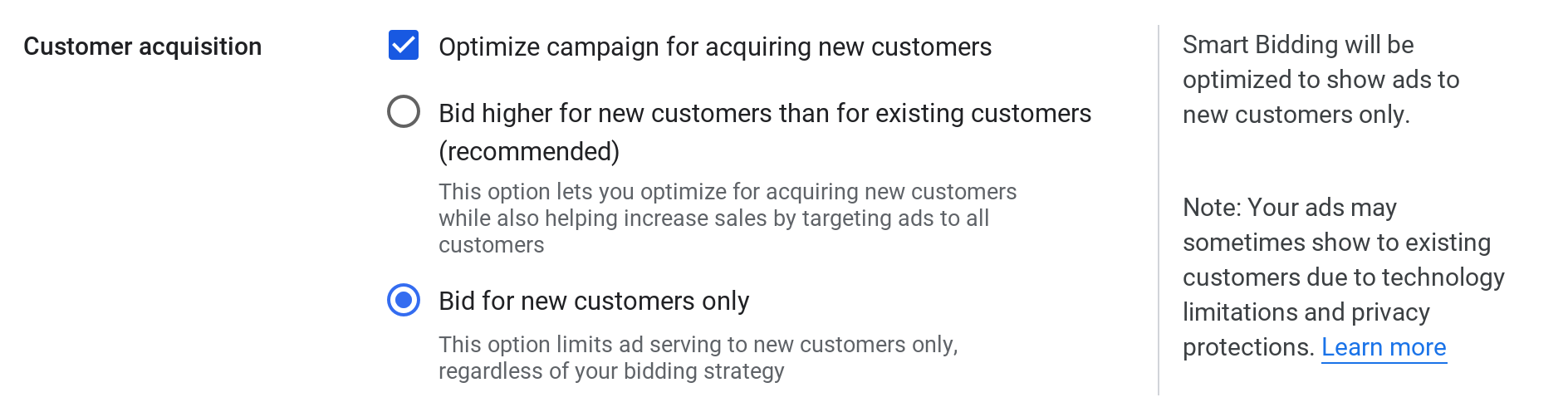
To do this, use the new customer acquisition optimization feature with the “Bid for new customers only” option in the campaign Settings section:
Select the audience list in question as your customer list:
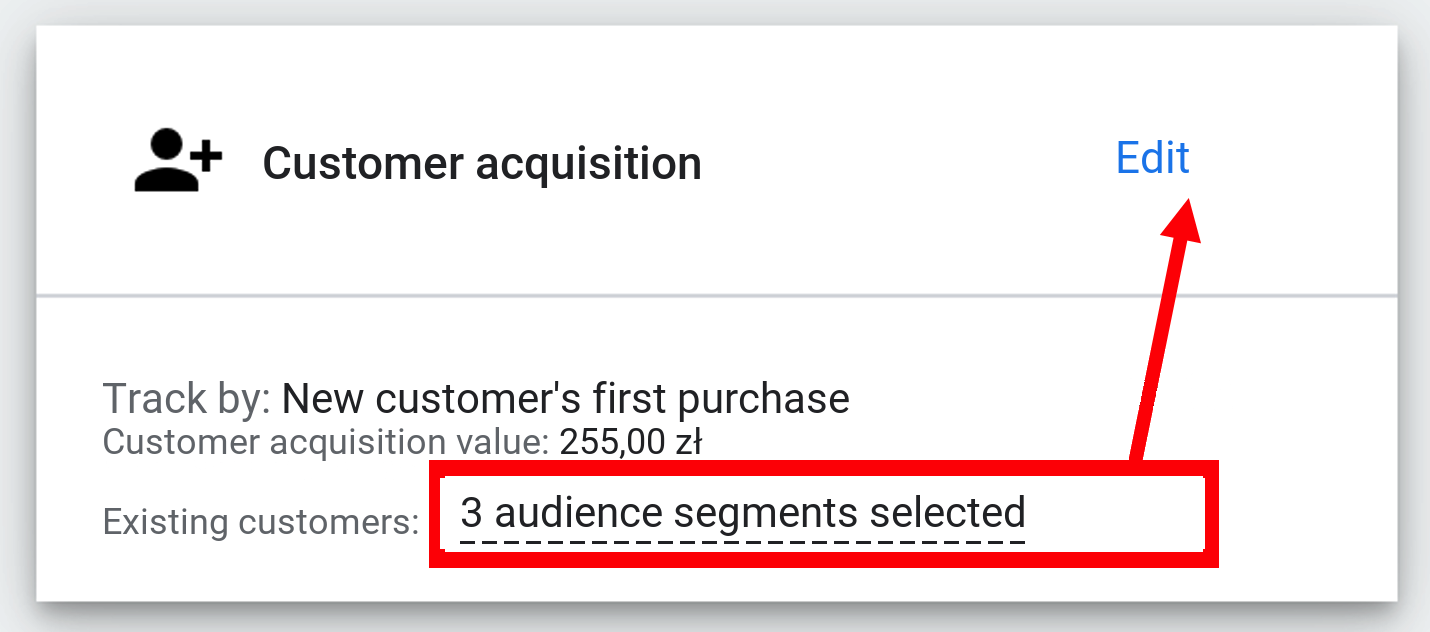
This way, the algorithm will avoid showing ads to people on that audience list.
Google notes that ads may still show to existing customers due to technology or privacy limitations — but exactly the same applies to all audience lists.
Google Ads technology is constantly changing. Despite our efforts, some of the information in this article may be out of date. Drop us a line if you notice the text needs updating.
