Assigning all of the conversion credit to a single interaction is a far-reaching simplification. Many interactions can appear on a user’s path, and each of them can potentially have a larger or smaller share in driving the conversion.
Previous article (part 7): Single-touch models
That’s why attribution modeling uses, alongside single-touch models, models that can take into account all the interactions that occurred on the path: multi-touch models.
The most important multi-touch models
The models described below were withdrawn from Google Ads and Analytics in 2023. More about attribution in Analytics in this article. Currently (January 2024) these models still apply in other attribution modeling tools, e.g. Campaign Manager and Search Ads 360 (Google Marketing Platform).
Currently (January 2024) the only multi-touch model available in Google Ads and Analytics is the algorithmic data-driven model.
Here are the most important heuristic attribution models:
The linear model
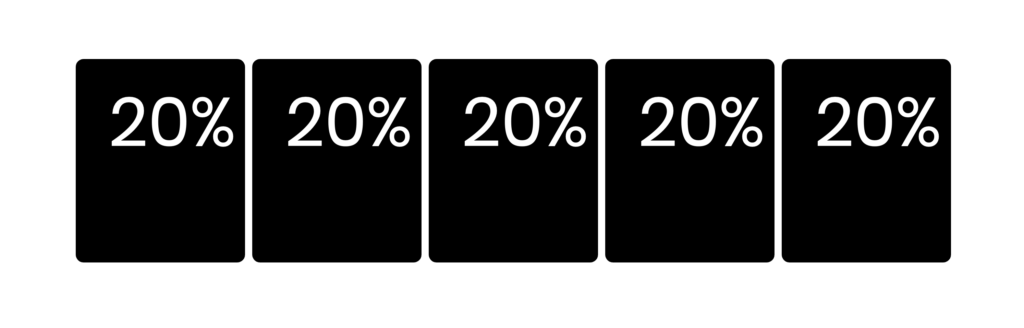
The linear attribution model assigns every interaction an equal weight — “the same for everyone”. With five interactions on the path, each will receive 20% of the credit.
The linear model can serve as a base model for building more advanced models.
The position-based model
The position-based model assigns a specific weight to: the first interaction, the last interaction, and, jointly, all the remaining (middle) interactions. Here is what attribution looks like with a 40/20/40 model:

Another typical model is 30/40/30, but in fact you can pick any position split you like, as long as the model supports customization.
The time decay model
The time decay model assigns interactions weights that get smaller the more time has passed between the interaction and the conversion. It uses the half-life formula — the same one that describes the decay of radioactive elements.
In the formula in the illustration, the value V(t) depends on the passage of time, where the constant V0 is the initial value and p is the half-life period. Note that the time axis points to the left:
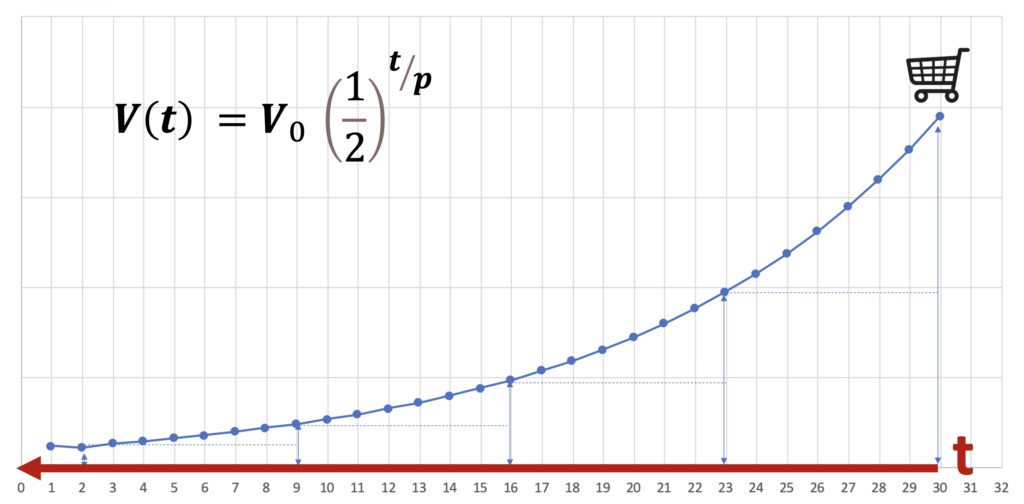
With a 7-day half-life, for four interactions, attribution will look as follows (the last interaction is on the right):

The half-life period is a parameter that can be modified. A very long half-life brings this model close to the linear model, while a very short half-life will make it similar to the last interaction model.
There is also an inverse time decay model (a mirror image), in which the largest value is assigned to the first interaction. In such a model, a very short decay period reduces it to the first interaction model.
The features described below were used in the previous version of Google Analytics (Universal Analytics) and are currently (January 2024) not available in Analytics (GA4). Attribution features in Campaign Manager (Google Marketing Platform) currently work in an analogous way.
The base models defined in the system can be modified by setting their own conversion window and changing the weights assigned to interactions, for example:
- Setting a custom conversion window (lookback window);
- Applying custom credit rules, which let you modify the weight assigned to specific interactions relative to the weight resulting from the base model, depending on the interaction type and its position on the path;
- Adjusting an interaction’s weight based on the engagement associated with it: time spent on the site or visit depth (the number of pages per visit).

The specific customization options depend on the given attribution modeling system. Information about configuring custom models can be found e.g. in the Campaign Manager help article on custom attribution models. Below are a few practical notes on using these models:
- When applying custom credit rules, keep in mind that “credit multiplied X times relative to other interactions in the conversion path” (see the illustration above) means modifying the weight of a given interaction while taking the model’s other rules into account. The number “X” is therefore a multiplier that increases the weight of a given interaction relative to the weight that interaction would have had if the custom rule had not been defined.
- In the default position-based model, both the first and the last interaction are assigned 40% of the conversion credit each — so the first and last interaction jointly hold 80% of the credit, and the remaining 20% is split evenly across the middle interactions. If there are only two interactions on the path, the share assigned by definition to the middle interactions is split in half between the first and the last interaction — in the default model they will therefore each get 50%.
The share assigned to the middle interactions is split in half between the first and the last interaction also when they have different shares defined, e.g. in a model where the first interaction gets 20%, the last interaction 50%, and the middle interactions 30%, with only two interactions on the path the first interaction will receive 20% + 30%/2 = 35%, and the last interaction will receive 50% + 30%/2 = 65% of the conversion credit.
- If there is only one interaction on the path, it will receive 100% of the conversion credit, regardless of any conditions.
- The weights assigned to the first, last and middle interactions in position-based models can be modified. A weight of 0% should be used with caution, especially if you want to apply additional custom rules. Interactions assigned a weight of zero will no longer respond to those rules in any way (a 0% share multiplied by even a very large multiplier is still 0%). In particular, there is little point in assigning 0% to the middle interactions and at the same time 0% to the first or last interaction, because then 100% of the conversion credit will be assigned to the last or first interaction respectively, and any additional custom rules will be ineffective (in other words, such models will behave exactly like the default last or first interaction models, without the ability to modify them).

- Similarly, “0” (zero) weights in additional custom rules should be used with caution. If, as a result of a combination of conditions, all interactions on the path were to be assigned zero conversion credit, then all of the conversion credit will be assigned to the very last interaction, regardless of the model used. If you want some interaction to be ignored, it’s better to assign it a very low weight, e.g. 0.00000001.
- Very low, fractional weights make it possible to create “fallback rules” analogous to those used in single-touch models. For example, if we don’t want direct visits and organic visits to receive conversion credit, but when the path contains only direct and organic we want the value to be attributed to organic, we can apply e.g. a weight of 0.00000001 to direct and a weight of 0.00001 to organic.
- Multi-touch models split the credit for each conversion across many sources, assigning them a fraction of the conversion. For this reason, conversions in attribution model comparison reports can have fractional values, while in reports based on the first/last interaction we will see conversions with two zeros after the decimal point.
Currently (January 2024) in Google Analytics all models, including multi-touch models, are non-direct models, i.e. they avoid attributing conversions to direct visits. Conversions are attributed to direct visits only when there are no interactions on the path other than direct.
Algorithmic models
A separate class of multi-touch models are algorithmic models, in which the assignment rules are determined by an algorithm and, naturally, their definitions cannot be presented in a simple way. Software vendors usually do not reveal the details of how these algorithms work.
Libraries are available (e.g. in Python or R) that make it possible to build algorithmic attribution models using, among others, Markov chains or the Shapley value.
Next article (part 9): The data-driven model.
Worth reading: A guide to attribution in Google Analytics
